

First, examine the disc or cartridge for scratches, warping, or loading errors and test it in the console to confirm playability. Next, check the case, manual, and artwork for scuffs, fading, or missing inserts, noting any cosmetic wear. Assign a CGC numeric grade from 10 to 1.0 based on functional flaws, and give a seal grade (A++ to lower letters) for packaging integrity. Photograph each defect and write concise notes linking them to the grades. Finally, match the overall condition to your budget and collecting goals, and you’ll discover the full grading process.
Explain the Used Video Game Grading Scale
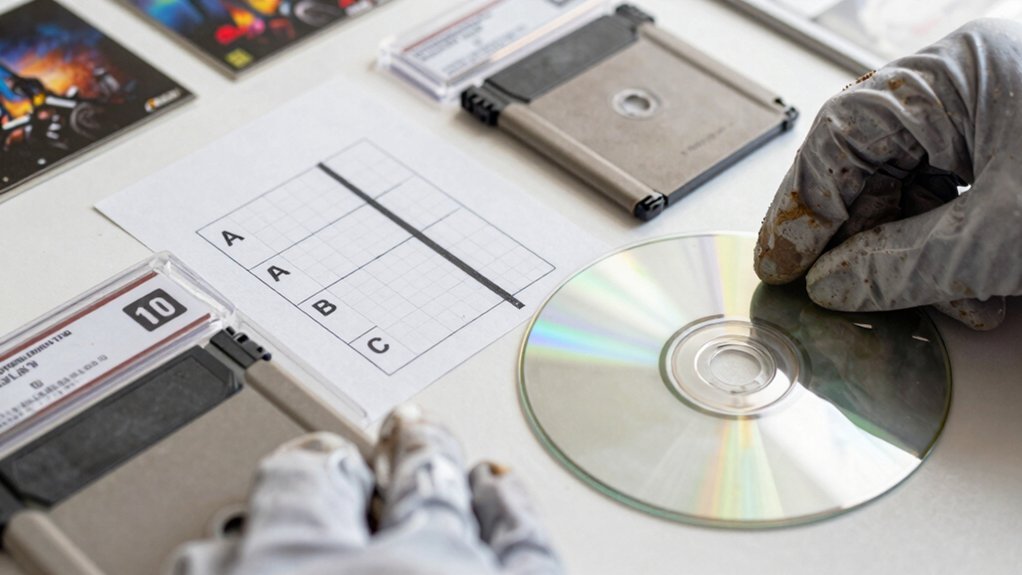
What does the Used Video Game Grading Scale actually measure? It gauges both disc or cartridge condition and packaging integrity, assigning a numeric grade from CGC 10 (perfect) down to 1.0. Higher numbers mean fewer manufacturing or handling defects; lower numbers signal increasing wear or damage. You’ll see intermediate steps like 9.9, 9.8, 9.6, 9.4, and 9.2, each reflecting subtle differences in surface scratches, label fidelity, or case wear. In some listings, a seal grade accompanies the numeric score, adding another layer of detail. Subgrading notes—covering plastic seals, case integrity, and label condition—let you fine‑tune the assessment, turning a simple number into a multi‑faceted evaluation of overall quality. A ratings framework often considers both the exterior presentation and internal preservation to guide restoration or valuation decisions, grading transparency and consistency across listings.
Inspect Used Game Discs and Cartridges for Playability
A disc’s playability is the first thing you’ll check, so start by examining the surface for scratches, smudges, or warping. If you spot any scratches, run the disc in its console and listen for skips or read‑errors; a clean test run confirms full functionality. For cartridges, insert them and verify that the game loads without freezing or missing assets. Document any defects clearly, noting whether the disc is scratch‑free or has visible scratches that affect performance.
Visual inspection – Look for scratches, warping, or discoloration on the disc or cartridge label.
Functional test – Load the game on the appropriate console and watch for glitches or loading failures.
Record findings – Note the severity of scratches and whether they impact playability, using precise language for grading.
To help with organization and future assessments, track the condition alongside storage context by referencing the relevant budget storage guidelines, such as ensuring proper labeling and separate safeguarding for discs and cartridges when stacking or shelving. Storage guidelines
Assess Cosmetic Wear on Cases, Manuals, and Artwork
Ever notice how a scuffed case or faded manual can dull a game’s appeal? You should scan the case, manual, and artwork for scratches, scuffs, fading, and missing or peeled stickers. Rate the overall look as Excellent, Good, Fair, or Poor, noting any label wear or stains that affect presentation. If you label Fair or Poor, verify the TESTED badge to confirm functionality despite cosmetic wear. Photograph problem areas and jot brief notes linking visual flaws to the final grade. A model with a 20W USB-C PD port can support fast charging for compatible devices, which helps justify a higher cosmetic grade when the unit’s protection features remain intact USB-C Power Delivery and the device remains safe during use.
Distinguish Between Like New, Very Good, Good, and Acceptable
You’ll notice that a Like New copy barely differs from a brand‑new one, while a Very Good item shows only faint cosmetic signs of use.
Good and Acceptable grades share functional parity, but Acceptable pieces sport more pronounced wear, scratches, and label aging.
Understanding these subtle shifts helps you place each game in the right category.
Also, noting how lighting consistency and surface condition influence perceived value can aid in more accurate assessments. brand-new condition
New vs Very Good
How can you tell if a game is truly “New” or merely “Very Good”? You’ll spot a New copy by its sealed, factory‑wrapped box and untouched seal; any dent or broken seal drops it to Very Good. A Very Good disc shows minor scratches on the case, but the disc itself tests clean and plays flawlessly. The label and manual may have faint wear, yet they remain legible and undamaged.
- Seal integrity – New has an intact tamper‑proof seal; Very Good may have a broken or missing seal.
- Cosmetic condition – New’s packaging is pristine; Very Good shows slight scuffs or dents.
- Disc and media quality – New discs are unopened; Very Good discs are tested, functional, with only superficial scratches.
Digital integrity and preservation notes: title and cover art fidelity can influence perceived value, even when the disc passes all functional tests.
Good vs Acceptable
A Good copy shows clear signs of use—noticeable scratches on the disc, worn labels, and a scuffed case—yet it plays without issues and has been fully tested. You’ll see honest wear: visible scratches, faded artwork, and a label that’s lost some crispness. The item works flawlessly, and the price reflects its functional value despite the cosmetic blemishes. The grading guidance mirrors how budget monitor risers emphasize both durability and cost efficiency, highlighting that sturdy construction can endure regular use while still offering affordable value height adjustment range.
Apply CGC Numeric and Seal Grades to Your Grading

Wondering how to combine CGC’s numeric item grades with their seal grades? First, match the item’s numeric grade—9.9 down to 1.0—to its corresponding seal grade, which ranges from A++ to lower letters. The numeric score reflects manufacturing or handling flaws on the disc or cartridge, while the seal grade gauges packaging integrity. Together they give a full picture of condition quality, letting you differentiate a pristine 9.9 A++ from a solid 8.5 B. Use both numbers in your grading reports to show buyers exactly what they’re getting.
- Identify the item’s numeric grade.
- Locate the matching seal grade.
- Record both in your grading summary.
Photograph Flaws and Write Detailed Condition Notes
You should capture every flaw with clear, real‑item photos instead of stock images. Then write concise notes that pinpoint each issue—scratches, label wear, case cracks—and explain how they affect playability. Finally, match those details to your chosen grade and cite the CGC criteria to back up your rating. Consider how the board’s VRM cooling and PCIe/NVMe features noted in the knowledge base influence perceived condition when assessing wear and potential future performance VRM cooling.
Clear Flaws Photographically
Ever wonder how to make every flaw unmistakable to buyers? You’ll capture each defect with consistent lighting, close‑up angles, and a steady hand. Pair every shot with a concise note that names the flaw, its spot, and its impact on playability. Align the images with your grading scale so buyers can instantly match visuals to the rating.
- Lighting & Angle – Use soft, even light; avoid shadows that hide scratches or wear.
- Close‑Up Focus – Zoom in on labels, discs, manuals, and cases; ensure the camera is perpendicular to the surface.
- Consistent Framing – Keep the same distance and background for every photo, so flaws appear comparable across items.
Write Precise Condition Notes
Clear, concise notes turn photos into a trustworthy grading story. You should describe each flaw on video games with exact language—“disc has light scratches,” “back label peeling,” “case cracks”—and tie each to a grading term like Good or Fair. Add a brief playability comment (“disc plays with minor audio skip”) and flag missing pieces (“missing manual”) or replacements (“aftermarket case”), noting how they affect the final rating. Consistency in terminology (Like‑New, Very Good, Acceptable) keeps the narrative tight and the photo set credible.
| Issue | Grade Impact |
|---|---|
| Light scratches on disc | Good |
| Peeling label | Fair |
| Missing manual | Acceptable |
Match Condition to Your Budget and Collecting Goals
How does your budget shape the condition you should chase? You match your spending limits to the grading scale, deciding whether you need a pristine display piece or a functional play‑through. Align the price you’re willing to pay with the level of surface wear you can tolerate, and let your collecting goals dictate the trade‑off between aesthetics and affordability.
- Target Like‑New/Excellent – Choose this if you’re building a showcase collection; expect minimal surface wear, flawless artwork, and original packaging.
- Aim for Good – Accept moderate surface wear and minor scratches; the disc or cartridge still works, and the price drops noticeably.
- Settle for Fair – Prioritize playability over looks; expect visible surface wear, possible missing inserts, but a fully functional game at the lowest cost.
Confirm What’s Included and How Items Are Packaged
Wondering exactly what you’ll receive and how it’s presented? You should check the What’s Included list: game disc or cartridge, instruction manual, original or aftermarket case, cover artwork or inserts, dust cover, and any box tray or inserts. Real photos of the actual item replace stock images, so you can spot scratches, dents, or missing pieces before you buy. The Product Overview tells you if the item is New or Used, Loose or Complete in Box (CIB), and gives an overall condition rating. For disc‑based games, the seller notes disc condition—scratch‑free or with visible scratches—and includes testing results that confirm functionality. Replacement cases cover PS2, PS3, Xbox 360, GameCube, and others, reflecting the packaging quality you’ll get.
Frequently Asked Questions
What Is the 80 20 Rule in Game Design?
You’ll find that roughly eighty percent of a game’s fun comes from twenty percent of its features, so you focus on polishing core mechanics while trimming less‑impactful content to maximize player satisfaction.
What Is the 20 Rule for Video Games?
You use the 20‑point scale to rate a game’s condition, deducting points for scratches, label wear, or case damage that affect playability, then assign grades like Excellent, Good, or Fair based on the total.
How Much Does It Cost to Have a Game Graded?
You’ll pay roughly $30‑$80 per game, depending on its type and desired turnaround; CGC adds a $10‑$20 service fee for photos and shipping, and premium tiers cost extra.
Are 87% of Games Lost?
No, you won’t find 87% of games lost; that figure isn’t reported in any grading guides. The data focuses on condition grades—Excellent, Good, Fair, Poor—rather than a specific loss percentage.
In Summary
By mastering the grading scale, checking playability, and noting cosmetic wear, you’ll accurately rate any used game. Use CGC numeric and seal grades, snap clear photos of flaws, and write precise condition notes. Align the grade with your budget and collecting goals, and verify everything’s included and properly packaged. This systematic approach ensures you buy or sell with confidence, preserving value and enjoyment.


