

You’ll get the coolest, quietest PC when you put front fans as intakes and rear or top fans as exhaust, because that creates a clear airflow path that pulls fresh air over the CPU/GPU and pushes hot air out. Matching the intake and exhaust CFM keeps the case at a modest positive pressure, which stops dust from settling and avoids noisy turbulence. Align your radiator so its hot‑air side faces the exhaust, and you’ll see efficient cooling with minimal noise—keep going to discover the exact fan counts and placement tricks.
Set Up Front, Intake, and Exhaust Fans (and Choose the Right Number) for the Best Airflow
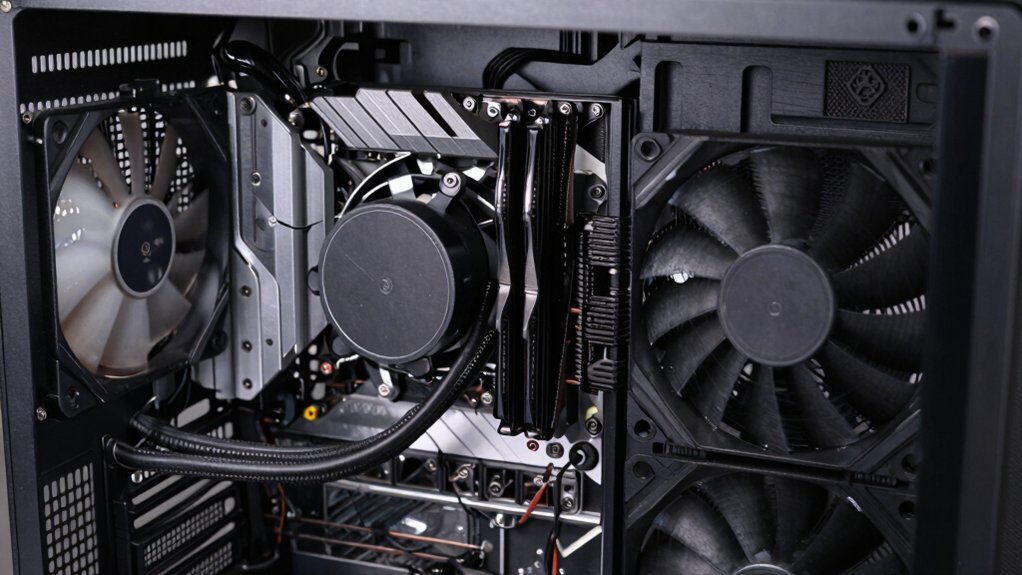
Front fans usually act as intake, pulling cool air in, while rear and top fans serve as exhaust, pushing hot air out. You’ll want two to three case fans to keep a solid front intake and rear exhaust pattern. Start with one or two front intake fans that draw fresh air across the CPU and GPU, then add a rear exhaust fan to pull the heated air out. If your case has a top vent, treat those fans as additional exhaust to complete the airflow loop. This fan positioning creates a pressure balance, prevents hot air from lingering, and maximizes cooling efficiency without over‑pressurizing the chassis. Proper cable management and keeping your cooling path clear is also crucial for maintaining consistent airflow to prevent throttling during long gaming sessions. Adjust the count based on radiator placement and any obstructions for optimal airflow.
Balancing Positive and Negative Pressure for Quiet, Efficient Case Fan Cooling
After setting up front intakes and rear/top exhausts, the next step is to fine‑tune the pressure balance for quieter, more efficient cooling. You’ll want a front fan that supplies enough fresh air while the rear exhaust pulls hot air out, creating a modest positive pressure that keeps dust from settling. Oversized intake can upset balance, so aim for a matched CFM between intake and exhaust to maintain steady airflow and reduce noise. Check radiator orientation so its hot‑air side aligns with the exhaust path, then run airflow testing—smoke or a simple hand‑wave—to confirm a smooth, quiet case cooling flow airflow balance.
How to Fit an AIO Radiator Without Messing Up Your Case Fan Flow

If you mount the AIO radiator so its fans follow the case’s intake‑exhaust flow, you keep the overall air path smooth and avoid creating a pressure bottleneck. Start by choosing a top radiator mount or rear radiator mount that aligns with the case exhaust. For a push‑through design, place the fans below the radiator so intake flow rises through the radiator and joins the exhaust path, preventing hot air from recirculating. In a push‑pull setup, ensure at least one fan pushes toward the active exhaust, preserving aeros case airflow and preventing eddy currents. Verify that nothing blocks the intake flow; clear air currents travel straight from the front intake, through the radiator, and out the rear or top exhaust, maximizing cooling efficiency. ventilation efficiency
Frequently Asked Questions
Does PC Fan Direction Really Matter?
Yes, fan direction matters; you need intakes pulling cool air in and exhausts pushing hot air out. Misaligned airflow traps heat, reduces cooling efficiency, and can cause thermal throttling.
Where Should Fans Be Placed in a PC Case?
Place front fans as intake, rear and top as exhaust, and side fans as intake if you have space. Align radiator fans with that airflow, and add a front intake when you only have one fan.
Where Is the Best Position for a Fan?
Place the fan at the rear as an exhaust; it pulls hot air out, creates a clear airflow path, and works best with a front intake, keeping components cool efficiently.
Are 3 Pin or 4 Pin Fans Better?
You’ll get finer, temperature‑driven control with 4‑pin PWM fans, so they’re generally better; 3‑pin fans still work, but they lack precise speed tuning and automatic curve responses.
In Summary
By placing your intake, exhaust, and AIO fans strategically, you’ll keep airflow smooth, pressure balanced, and temperatures low. Remember to match fan counts, avoid blocking vents, and keep positive or negative pressure in check. When you get the flow right, your system stays quiet, efficient, and ready for any workload.


Leave a Reply