
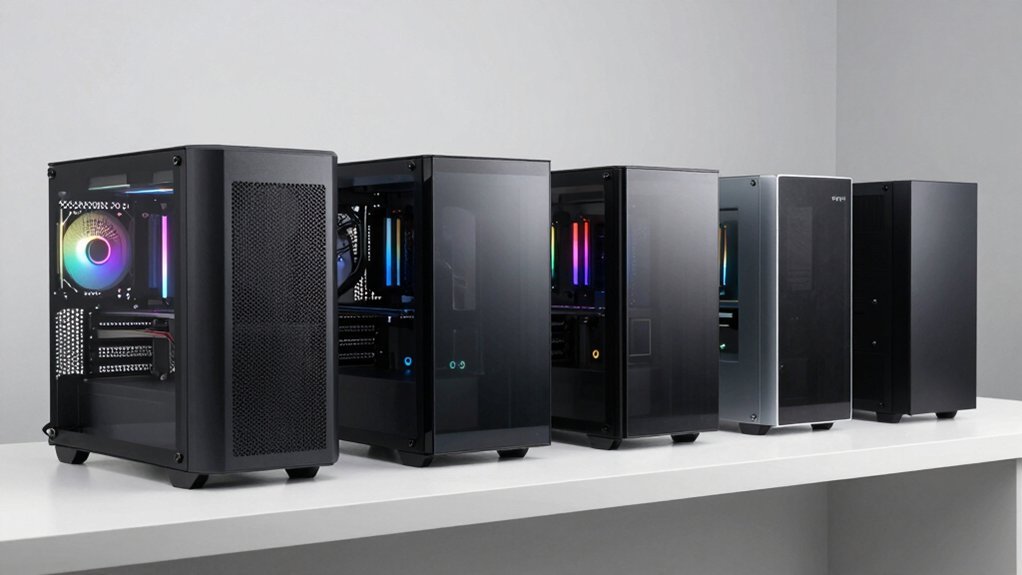
You don’t need to empty your wallet for a PC case that turns heads. Today’s budget options deliver premium aesthetics and performance without the luxury price tag. From tempered glass panels to sophisticated ARGB lighting and intelligent airflow design, manufacturers have mastered the art of creating affordable cases that feel premium in every way. Want to know which budget cases offer the best combination of style, cooling capability, and build quality? The answer might surprise you.
| ASUS Prime AP202 mATX Case with ARGB Fans |  | Compact Showcase | Form Factor: mATX | Tempered Glass: Curved glass from front to side | Fan Configuration: 3 ARGB fans pre-installed | VIEW LATEST PRICE | Read Our Analysis |
| ASUS TUF Gaming GT302 ARGB White Mid-Tower PC Case |  | Airflow Champion | Form Factor: ATX Mid-Tower | Tempered Glass: Tempered glass side panel (interchangeable with mesh) | Fan Configuration: 4 ARGB fans (140mm) pre-installed | VIEW LATEST PRICE | Read Our Analysis |
| MONTECH XR-B ATX Gaming Case with ARGB Fans |  | Versatile Performer | Form Factor: ATX Mid-Tower | Tempered Glass: Dual tempered glass panels | Fan Configuration: 3 ARGB PWM fans pre-installed (1500 RPM) | VIEW LATEST PRICE | Read Our Analysis |
| FOIFKIN F300 ATX Mid-Tower Gaming PC Case (Black) |  | Panoramic Display | Form Factor: ATX Mid-Tower | Tempered Glass: 270° panoramic tempered glass | Fan Configuration: 4 non-LED fans pre-installed | VIEW LATEST PRICE | Read Our Analysis |
| MUSETEX ATX PC Case with Tempered Glass and Pre-Installed Fans |  | Best Value | Form Factor: ATX Mid-Tower | Tempered Glass: 270° dual tempered glass panels | Fan Configuration: 3 fans pre-installed (non-ARGB) | VIEW LATEST PRICE | Read Our Analysis |
More Details on Our Top Picks
ASUS Prime AP202 mATX Case with ARGB Fans
Looking for premium aesthetics without the premium price tag? The ASUS Prime AP202 delivers with its stunning curved tempered glass panel that wraps from front to side, showcasing your components in panoramic glory.
You’ll appreciate the practical touches – the easy-detach rail system makes panel removal a breeze, while the patented slot vent keeps your GPU running cool. With clearance for graphics cards up to 420mm and radiators up to 360mm, this case accommodates serious hardware.
The three pre-installed ARGB fans and integrated light band sync seamlessly with Aura Sync, creating cohesive lighting effects throughout your build.
- Form Factor:mATX
- Tempered Glass:Curved glass from front to side
- Fan Configuration:3 ARGB fans pre-installed
- Radiator Support:Up to 360mm
- GPU Clearance:Up to 420mm
- Front I/O Ports:Not specified
- Additional Feature:Curved panoramic glass
- Additional Feature:Easy-detach rail system
- Additional Feature:Patented GPU slot vent
ASUS TUF Gaming GT302 ARGB White Mid-Tower PC Case
The ASUS TUF Gaming GT302 ARGB White Mid-Tower PC Case proves that premium airflow design doesn’t require premium pricing. Four pre-installed 140mm ARGB fans with thick 28mm frames deliver exceptional cooling performance while maintaining quiet operation.
What sets the GT302 apart is its versatility. You’ll appreciate the interchangeable side panel that lets you switch between tempered glass for showcasing components or mesh for maximizing airflow. The removable top panel simplifies AIO cooler installation and cable management.
The high-porosity square mesh and hidden connector design for ATX motherboards complete this value-packed case that performs like cases twice its price.
- Form Factor:ATX Mid-Tower
- Tempered Glass:Tempered glass side panel (interchangeable with mesh)
- Fan Configuration:4 ARGB fans (140mm) pre-installed
- Radiator Support:Not specified
- GPU Clearance:Not specified
- Front I/O Ports:Not specified
- Additional Feature:Interchangeable side panels
- Additional Feature:Detachable top panel
- Additional Feature:Hidden connector design
MONTECH XR-B ATX Gaming Case with ARGB Fans
Elegance meets affordability with MONTECH’s XR-B ATX Gaming Case, where premium aesthetics blend seamlessly with high-performance functionality. The distinctive wood-grain I/O interface and dual tempered glass panels create a nature-inspired luxury look that defies its budget price tag.
You’ll appreciate the cooling capabilities with three pre-installed 1500 RPM ARGB PWM fans (two reverse-blade side fans and one rear regular-blade), with expansion options for up to nine fans total. Despite its compact footprint, the XR-B accommodates high-end GPUs like the RTX 4090 and supports a 360mm top radiator, ensuring your premium components perform optimally without thermal compromise.
- Form Factor:ATX Mid-Tower
- Tempered Glass:Dual tempered glass panels
- Fan Configuration:3 ARGB PWM fans pre-installed (1500 RPM)
- Radiator Support:Up to 360mm (top)
- GPU Clearance:Supports high-end GPUs (RTX 4090)
- Front I/O Ports:Wood-grain design I/O interface
- Additional Feature:Wood-grain I/O interface
- Additional Feature:Reverse-blade fan design
- Additional Feature:Supports 40-series GPUs
FOIFKIN F300 ATX Mid-Tower Gaming PC Case (Black)
At first glance, you’d mistake the FOIFKIN F300 for a premium case with its striking 270° panoramic tempered glass design, yet it comes with a budget-friendly price tag.
This 2025 model delivers substance alongside style with four pre-installed non-LED fans that prioritize cooling over RGB flash. You’ll appreciate the tool-free glass panel that offers both easy access and excellent sound insulation.
Component compatibility is impressive with room for ATX motherboards, 400mm GPUs, and up to three 360mm liquid coolers. The front I/O provides essential connectivity with USB Type-C 3.0 and audio ports.
FOIFKIN backs their product with quality guarantees and responsive customer support.
- Form Factor:ATX Mid-Tower
- Tempered Glass:270° panoramic tempered glass
- Fan Configuration:4 non-LED fans pre-installed
- Radiator Support:Up to 3 x 360mm liquid coolers
- GPU Clearance:Up to 400mm
- Front I/O Ports:1× Type-C 3.0, 1× USB 3.0, 1× USB 2.0, Audio jacks
- Additional Feature:270° dual cabin design
- Additional Feature:Tool-free panel disassembly
- Additional Feature:Sound insulation properties
MUSETEX ATX PC Case with Tempered Glass and Pre-Installed Fans
Looking for dual-chamber design with premium aesthetics at a budget price? The MUSETEX Y6 delivers with its 270° dual tempered glass panels that showcase your build while providing sound insulation.
You’ll appreciate the tool-less snap-on panels and three pre-installed 120mm fans. The case accommodates hefty components with space for GPUs up to 400mm and CPU coolers up to 176mm. Its thoughtful layout includes magnetic dust filters and an independent PSU ventilation channel for optimal cooling.
The black matte texture and high-speed I/O ports (including USB 3.2/Type-C) round out this value-packed case that punches well above its price point.
- Form Factor:ATX Mid-Tower
- Tempered Glass:270° dual tempered glass panels
- Fan Configuration:3 fans pre-installed (non-ARGB)
- Radiator Support:Up to 360mm (top)
- GPU Clearance:Up to 400mm
- Front I/O Ports:USB 3.2/Type-C, USB 3.0, additional interfaces
- Additional Feature:Dual-chamber thermal design
- Additional Feature:Magnetic dust filters
- Additional Feature:Snap-on quick panels
Factors to Consider When Choosing Budget PC Cases With Premium Features
When shopping for budget PC cases with premium features, you’ll need to balance practical considerations like airflow against aesthetic elements such as glass panel variations and RGB lighting integration. Your case should offer effective thermal management solutions to prevent overheating while maintaining that high-end look you’re after. Don’t overlook cable management features, which can transform a cluttered budget build into a clean, professional-looking system that rivals much more expensive setups.
Airflow vs. Aesthetic Design
How do you choose between keeping your components cool and having a PC that looks stunning? Today’s budget cases increasingly offer both. Airflow-focused designs feature mesh fronts and multiple high-CFM fans to maximize cooling efficiency, while aesthetic-centric cases showcase tempered glass and synchronized ARGB lighting that can limit airflow.
The smartest budget options now include interchangeable or removable panels, letting you swap between optimal cooling and visual appeal. Look for cases that support multiple fan mounting positions (up to 9) and larger radiators (360mm+) while maintaining clean aesthetics.
Remember that visual elements often impact noise levels and cooling performance. Dense cabling and obstructions behind tempered glass can affect acoustic properties, so prioritize cases that cleverly balance thermal efficiency with eye-catching design.
Glass Panel Design Variations
Budget cases have dramatically improved their glass implementations, creating visual wow-factor that rivals premium models. You’ll find options ranging from full panoramic panels to dual-panel setups that showcase your components from multiple angles.
Many affordable cases now feature tempered glass instead of acrylic, offering superior scratch and impact resistance for long-term durability. Look for cases with 270° panoramic designs if you want maximum visibility of your build from different viewpoints.
The best budget options incorporate tool-free removal systems for easy access during upgrades while maintaining secure panel retention. Some even include integrated features like curved glass and ARGB-compatible light bands that synchronize with your components for cohesive lighting effects. These thoughtful design elements deliver a premium aesthetic without the premium price tag.
RGB Lighting Integration
Why settle for dull aesthetics when today’s affordable cases offer sophisticated RGB lighting that rivals high-end models? Budget cases now include pre-installed ARGB fans that deliver immediate customization without additional purchases. You’ll find these integrated solutions particularly valuable as they seamlessly connect to ecosystems like Aura Sync, creating unified lighting effects across your entire build.
Look for cases featuring integrated light bands and panoramic glass panels that amplify and diffuse RGB lighting throughout your system. The contrast between white or black panels and vibrant ARGB fixtures creates stunning visual impact while maintaining visibility of internal components. Most budget options now include controllers that let you adjust colors, patterns, speed, and brightness—even without compatible motherboard software. This level of personalization was once exclusive to premium cases but is now remarkably accessible.
Thermal Management Solutions
While high-end cooling used to be a luxury feature, today’s budget cases offer exceptional thermal management that keeps your components running at their best under load. Look for cases with mesh or high-porosity panels that maximize front-to-back airflow and support multiple fan configurations, including 360mm radiator compatibility.
Pre-installed ARGB fans aren’t just for show—they enhance cooling visibility while preventing hotspots when properly positioned. The best budget options feature dual-chamber designs or isolated PSU compartments that separate heat-generating components from your GPU and CPU.
Don’t overlook practical features like removable panels for easier radiator installation and comprehensive dust management systems with quick-access filters. These design elements maintain cooling efficiency over time, ensuring your budget case delivers premium thermal performance without the premium price tag.
Cable Management Features
How did sleek cable management become accessible at every price point? Today’s budget cases incorporate premium design elements that were once exclusive to high-end models. You’ll find tool-less panels that make routing cables significantly easier during your build process, saving time and frustration.
Look for cases featuring removable cable channels and strategic cutouts that let you tuck power cables behind the motherboard tray. Many budget options now include PSU shrouds or dual-chamber designs that separate your power supply from the main compartment, instantly elevating the interior’s appearance.
Smart features like dedicated front-panel cable grommets ensure your I/O connections remain accessible without creating visual clutter. When combined with multiple fan mount locations, these cases help maintain both organized cabling and optimal airflow—proving you don’t need to spend big for a clean, professional-looking build.
Motherboard Form Factor Support
When selecting a budget case with premium aspirations, motherboard compatibility forms the foundation of your entire build. Most budget-friendly cases support at least micro-ATX boards, but the best budget options offer full ATX compatibility, giving you flexibility for future upgrades.
Remember that while ATX cases can house smaller motherboards like mATX or ITX, the reverse isn’t possible. A case labeled specifically for mATX won’t accommodate larger boards, regardless of price. When browsing budget options, verify the supported form factors in the specifications to avoid painful compatibility issues.
Consider your expansion needs too—ATX cases typically provide more drive bays and PCIe slots, while mATX and ITX options deliver compactness at the cost of expandability. Premium budget cases strike the perfect balance between size constraints and versatile motherboard support.
GPU Clearance Specifications
Why do budget cases often fall short? They typically sacrifice GPU clearance, limiting your ability to install high-performance graphics cards that excel in gaming and creative workloads.
When evaluating budget cases with premium aspirations, check the specified GPU length accommodation. Premium-feeling cases offer at least 330mm of clearance, with the best budget options pushing toward 360-380mm like their pricier counterparts. Don’t overlook how radiator placement and drive cages might reduce this measurement in practice.
Pay attention to the clearance details for your specific motherboard form factor, as some cases offer different GPU space depending on whether you’re using ATX or mATX. Also verify that power connector orientation won’t interfere with your card, especially with newer GPUs requiring additional headroom for angled power adapters.
Frequently Asked Questions
How Do Budget PC Cases Affect System Cooling and Airflow?
Budget PC cases often compromise cooling with fewer fan mounts, limited airflow paths, and thinner materials that trap heat. You’ll notice higher temperatures unless you’re strategic about component placement and additional cooling solutions.
Can Budget Cases Accommodate Liquid Cooling Radiators?
Yes, many budget cases can fit liquid cooling radiators, though they’re typically limited to 240mm options in front or top mounts. You’ll want to check specific clearances and mounting points before purchasing your case.
What’s the Average Lifespan of Pre-Installed ARGB Fans?
Pre-installed ARGB fans typically last 2-3 years with regular use, though you’ll see higher quality ones survive 5+ years. You can extend their lifespan by keeping dust levels low and running them at moderate speeds.
Are Budget Case Materials More Prone to Scratching?
Yes, budget cases often use thinner, less durable materials like basic steel and plastic that scratch more easily than premium cases with tempered glass, higher-grade metals, or quality finishes you’ll find in luxury options.
How Do These Cases Handle Cable Management for Cleaner Builds?
Most budget cases now offer rubber grommets, designated cable channels, and tie points. You’ll find they’re surprisingly good at hiding cables with their PSU shrouds and strategic back panel space for cleaner builds.


Leave a Reply