
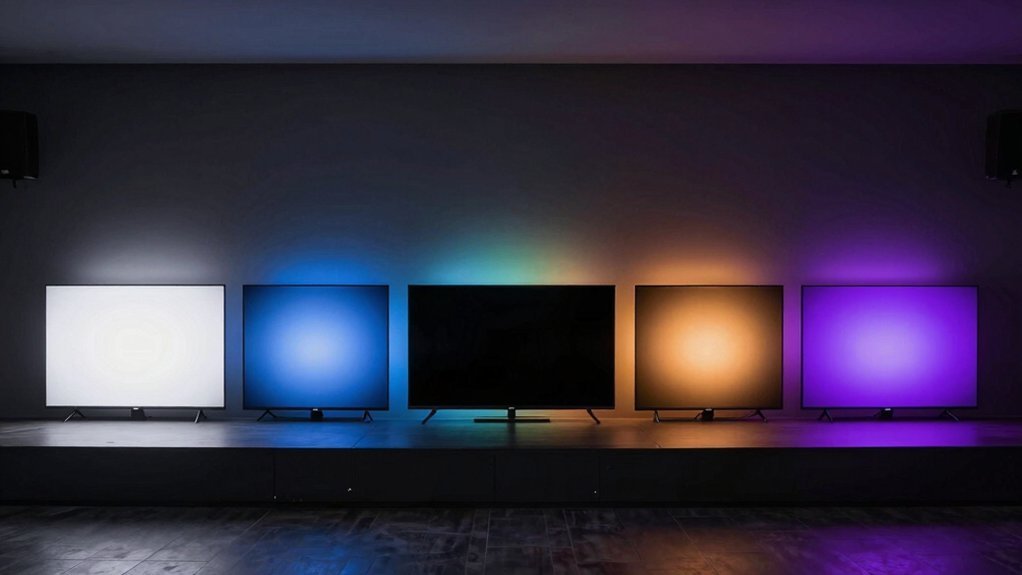
Your eyes deserve better than the harsh glare of a monitor in a dark room. If you’ve noticed increased eye strain during late-night work sessions or gaming marathons, bias lighting might be the affordable solution you’ve overlooked. These budget-friendly options create a gentle backlight that reduces contrast fatigue without breaking the bank. The right choice can transform your viewing experience while protecting your vision—and you won’t need an engineering degree to set it up.
| Luminoodle Bias Lighting LED Backlight for Monitors | 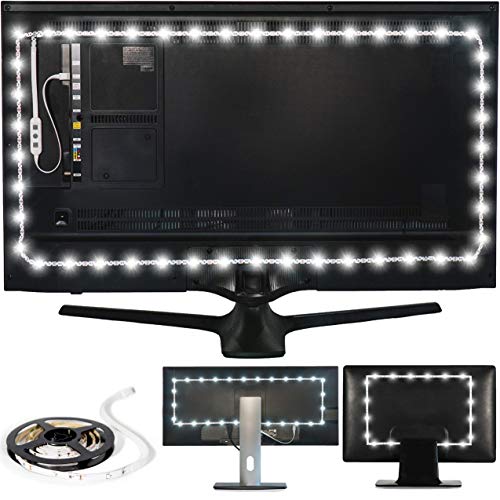 | Basic Budget Pick | Light Type: White LED backlight strip | Display Compatibility: Monitors up to 24″ | Color Temperature: 6500K (true white) | VIEW LATEST PRICE | Read Our Analysis |
| HAMLITE TV Bias Lighting for 70-85 Inch TVs |  | Best for Large TVs | Light Type: RGBW LED backlight strip | Display Compatibility: TVs 70-85 inch | Color Temperature: 6500K (true white) + RGB colors | VIEW LATEST PRICE | Read Our Analysis |
| Monitor Light Bar with Backlight for Eye Care |  | Eye Protection Plus | Light Type: Dual light (front/back) bar | Display Compatibility: Flat monitors (not laptops/curved) | Color Temperature: 3100K-6400K (adjustable) | VIEW LATEST PRICE | Read Our Analysis |
| Quntis RGB Monitor Light Bar with Dimmable Front Light |  | Gaming Essential | Light Type: Dual light RGB bar | Display Compatibility: Monitors 0.39″-1.18″ thick | Color Temperature: 3000K, 4000K, 6500K | VIEW LATEST PRICE | Read Our Analysis |
| Quntis RGB Pro+ Monitor Light Bar with Remote Control |  | Premium Upgrade | Light Type: RGB Pro+ light bar with front/back lighting | Display Compatibility: Most monitors including 1500R+ ultrawide | Color Temperature: 3000K-6500K (4 settings) | VIEW LATEST PRICE | Read Our Analysis |
More Details on Our Top Picks
Luminoodle Bias Lighting LED Backlight for Monitors
When you’re struggling with eye strain during late-night computing sessions, the Luminoodle Bias Lighting LED Backlight offers an affordable solution for monitors up to 24 inches. This 39-inch LED strip emits true white light (6500K) that reduces eye fatigue by balancing the contrast between your bright screen and dark surroundings.
Setup couldn’t be simpler—just clean your monitor’s back, attach the strip using the included 3M adhesive, and plug it into any 5V/1A USB port. The light powers on and off with your device, requiring no additional controls. At just 5 watts, it’s an energy-efficient way to enhance your viewing comfort without straining your budget.
- Light Type:White LED backlight strip
- Display Compatibility:Monitors up to 24″
- Color Temperature:6500K (true white)
- Power Source:USB 5V, 1A
- Installation Method:3M adhesive strips
- Eye Protection Features:Reduces eye strain
- Additional Feature:39-inch (1m) length
- Additional Feature:3M adhesive mounting
- Additional Feature:5W power consumption
HAMLITE TV Bias Lighting for 70-85 Inch TVs
The HAMLITE TV Bias Lighting offers a budget-friendly solution for owners of large 70-85 inch TVs who want to reduce eye strain while enhancing their viewing experience.
This 18ft LED strip provides four-sided W-shape coverage with 6500K pure white light that reduces contrast-related eye fatigue and improves perceived image clarity. You’ll appreciate the easy installation—no corner connectors required—and versatile lighting options with 18 colors and 10 modes.
The RF remote lets you customize brightness and speeds, while the memory function saves your preferred settings. Though it’s USB-powered, check your TV’s compatibility before purchasing. Beyond TVs, you can use it for gaming setups or mood lighting around furniture.
- Light Type:RGBW LED backlight strip
- Display Compatibility:TVs 70-85 inch
- Color Temperature:6500K (true white) + RGB colors
- Power Source:USB 5V, 1A
- Installation Method:Adhesive tape
- Eye Protection Features:Reduces eye strain, relieves headaches
- Additional Feature:18-foot wraparound coverage
- Additional Feature:Memory function capability
- Additional Feature:18 colors/10 modes
Monitor Light Bar with Backlight for Eye Care
Searching for a monitor light solution that won’t strain your eyes during late-night work sessions? This dual-light bar offers both front and back illumination with an asymmetrical design that lights your desk without causing screen glare.
You’ll appreciate the flicker-free, blue-light-free illumination from 78 high-quality LEDs that mimic natural daylight. With three color temperatures (3100K-6400K) and stepless dimming, you can customize your perfect lighting environment.
The space-saving design mounts directly on your monitor, and its memory function recalls your settings after power loss. Its Ra98 color rendering ensures vibrant, true-to-life colors for reading, gaming, or extended computer use.
- Light Type:Dual light (front/back) bar
- Display Compatibility:Flat monitors (not laptops/curved)
- Color Temperature:3100K-6400K (adjustable)
- Power Source:USB (not specified)
- Installation Method:Monitor-top mount
- Eye Protection Features:No blue light, flicker-free
- Additional Feature:78 high-quality LEDs
- Additional Feature:CRI Ra98 color rendering
- Additional Feature:Dimming memory function
Quntis RGB Monitor Light Bar with Dimmable Front Light
Gamers seeking both desk illumination and RGB ambiance will find the Quntis RGB Monitor Light Bar an impressive dual-purpose solution. Its dual light design combines front illumination for your workspace with customizable RGB backlighting, creating balanced lighting that reduces eye strain from contrast glare.
You’ll appreciate the 15 RGB backlight modes accessible with a simple tap, offering everything from solid colors to dynamic gradients that enhance your gaming atmosphere. With three color temperature options (3000K-6500K), adjustable brightness, and exceptional color accuracy (Ra95), this light bar delivers both function and flair. The space-saving design clips securely to most flat monitors between 0.39″-1.18″ thick.
- Light Type:Dual light RGB bar
- Display Compatibility:Monitors 0.39″-1.18″ thick
- Color Temperature:3000K, 4000K, 6500K
- Power Source:USB (not specified)
- Installation Method:Weighted clip with non-slip rubber
- Eye Protection Features:No blue light, flicker-free
- Additional Feature:Front-back dual illumination
- Additional Feature:Ra95 color rendering
- Additional Feature:15 RGB lighting modes
Quntis RGB Pro+ Monitor Light Bar with Remote Control
For those seeking versatile bias lighting with premium features at a wallet-friendly price, Quntis RGB Pro+ Monitor Light Bar delivers impressive value. Its 20″ aluminum alloy frame mounts effortlessly above your monitor with a patented weighted clip that works even with ultrawide curved displays.
You’ll enjoy customizable lighting with four color temperatures, 15 RGB modes, and 100 brightness levels. The remote control lets you create over 240 lighting combinations to suit your mood or activity. With flicker-free technology and high color accuracy (Ra95), your eyes will appreciate reduced strain during long sessions, whether you’re gaming, working, or binging shows.
- Light Type:RGB Pro+ light bar with front/back lighting
- Display Compatibility:Most monitors including 1500R+ ultrawide
- Color Temperature:3000K-6500K (4 settings)
- Power Source:USB-C (DC 5V/1.5A)
- Installation Method:Sliding weighted clip with retractable clamp
- Eye Protection Features:No blue light risk (RG0), flicker-free
- Additional Feature:20-inch size design
- Additional Feature:Remote control operation
- Additional Feature:100 brightness levels
Factors to Consider When Choosing Budget Bias Lighting for Eye Comfort
When selecting budget bias lighting to reduce eye strain, you’ll need to weigh several key factors that affect performance and comfort. Your ideal choice should match your monitor’s color temperature, fit your screen size properly, and offer convenient power options that work with your setup. The quality of light distribution and ease of installation will ultimately determine whether your affordable bias lighting truly delivers the eye comfort you’re seeking.
Color Temperature Matters
Why does color temperature play such a transition role in bias lighting? It directly impacts both your viewing experience and eye comfort. True white light at 6500K matches the standard used by most monitors and TVs, creating a seamless visual shift between your screen and surroundings.
When you choose cooler lighting (6500K), you’re mimicking daylight conditions that reduce perceived glare and maintain accurate color representation on your screen. In contrast, warmer options (3000-4000K) create a cozier atmosphere but might compromise the perceived contrast of your display.
For optimal eye comfort, you’ll want your bias lighting’s brightness to closely match your screen’s luminance. If possible, invest in adjustable temperature options (3000K-6500K) to customize your setup based on viewing conditions and personal preference.
Screen Size Compatibility
Just as color temperature affects your viewing experience, the relationship between your bias lighting and screen size plays a crucial role in maximizing eye comfort. Your lighting strip should match or exceed your screen’s diagonal measurement to ensure even illumination without dark corners or glare.
For smaller monitors up to 24 inches, a 39-inch (1 meter) strip typically provides sufficient coverage. Larger displays demand proportionally longer solutions—70-85 inch TVs benefit from 18-foot setups that wrap all four sides.
When shopping on a budget, don’t skimp on length. Undersized lighting creates uneven ambient glow and visible seams, undermining the eye comfort benefits you’re seeking. Look for modular options that let you customize length according to your specific screen dimensions, ensuring full, consistent backlighting without wasting money on excess strip length.
Power Source Options
How you power your budget bias lighting considerably impacts its performance and convenience. Most bias lighting kits run on USB power, requiring a 5V, 1A supply to function properly. Before connecting to your TV’s USB port, verify it can deliver sufficient current—inadequate power will result in dim or flickering LEDs.
You’ll need to check the kit’s power specifications (typically listed as 5V, 1A or 5W) to ensure compatibility with your power source. Some kits include extended USB cables, while others might require external adapters to reach available outlets or USB hubs.
If your TV’s USB ports don’t provide enough power or turn off when the screen sleeps, consider using a dedicated wall adapter instead. This ensures consistent brightness without risking damage to your TV’s power system.
Installation Ease
Beyond considering your power source options, the installation process itself affects both your initial setup experience and long-term satisfaction with bias lighting.
Look for strips with quality adhesive backing (typically 3M) that attaches securely to your display’s rear edge. Before mounting, clean the surface thoroughly—dust and oils can significantly reduce adhesion strength and longevity.
Measure your monitor’s thickness and bezel width before purchasing. Some budget models won’t fit properly on ultra-thin displays or might interfere with narrow bezels. You’ll want strips that conform well to your specific setup.
Consider lighting direction carefully. Two-sided or front-facing lights may cause unwanted glare. Opt for flicker-free, low-blue-light designs that direct illumination against the wall for better eye protection and comfort during extended viewing sessions.
Light Distribution Quality
When selecting budget bias lighting, light distribution quality becomes the critical factor determining whether you’ll experience genuine eye relief or merely aesthetic enhancement. Look for options that provide even illumination around your entire screen, not just spotty coverage along one edge.
The best budget solutions offer 4-sided or at least top-and-back configurations that create uniform light behind your display, eliminating harsh contrast edges. You’ll want high-CRI ratings (aim for Ra95) to ensure natural color reproduction without distortion.
Choose systems with consistent 6500K color temperature for optimal contrast and reduced eye fatigue. Don’t overlook adjustability—even budget options should offer variable brightness (0-100%) that lets you match your lighting to ambient conditions throughout the day, saving your preferred settings for different scenarios.
Eye Strain Reduction
Why do so many budget bias lighting solutions fail at their most fundamental purpose—reducing eye strain? They miss critical features that truly protect your vision during extended screen time.
For effective strain reduction, look for bias lights with true white color temperature (6500K), which minimizes the perceived contrast between your screen and surroundings. Your eyes won’t need to constantly readjust, preventing fatigue. Choose USB-powered options that synchronize with your display’s power cycle, maintaining consistent ambient lighting.
Consider placement carefully—lights that illuminate both the wall behind your screen and surrounding surfaces create a balanced viewing environment. Finally, don’t compromise on high CRI (95+) and flicker-free operation. These features ensure accurate color representation and eliminate the subconscious strain from imperceptible flickering that cheaper options often overlook.
RGB vs. White
The choice between RGB and white bias lighting represents one of the most significant decisions you’ll make when shopping on a budget. Each serves distinct purposes for your setup.
White bias lighting at 6500K delivers consistency with superior glare reduction and color accuracy. It’s typically flicker-free with high CRI, making it ideal if your primary goal is reducing eye strain while maintaining true colors on your screen.
RGB options offer flexibility with multiple colors and modes to match your room’s ambiance or content. However, they may alter your perception of on-screen colors and sometimes require additional power or calibration.
If you prioritize eye comfort with minimal distraction, white lighting provides a simpler, more consistent solution. Choose RGB when you value aesthetic customization and mood-setting capabilities over perfect color accuracy.
Brightness Adjustment Range
How effectively your bias lighting reduces eye strain depends largely on its brightness adjustment capabilities. Even budget options should offer a wide adjustment range, letting you match your ambient light to both your screen brightness and changing room conditions throughout the day.
Look for systems with flicker-free dimming that maintain stable light output at all brightness levels. This prevents the subtle flickering that can cause additional eye fatigue. Features like memory presets or saved brightness levels are valuable, allowing you to quickly restore your preferred settings after power interruptions.
The best budget bias lighting performs consistently across its entire brightness spectrum, from the dimmest setting for dark room movie nights to maximum brightness for daytime use when competing with natural light.
Frequently Asked Questions
Can Bias Lighting Help With Headaches From Computer Screens?
Yes, bias lighting can help reduce your headaches from computer screens by decreasing eye strain. It creates contrast between your screen and surroundings, making your eyes work less hard.
How Long Do LED Bias Lights Typically Last Before Needing Replacement?
LED bias lights typically last 25,000 to 50,000 hours before replacement. You’ll enjoy 3-5 years of daily use, though higher quality lights can last even longer with proper care.
Will Bias Lighting Increase My Electricity Bill Significantly?
No, LED bias lighting won’t substantially increase your electricity bill. You’ll likely spend only a few dollars yearly, as these lights consume minimal power compared to your TV or monitor.
Can Bias Lighting Work Effectively in Brightly Lit Rooms?
No, bias lighting isn’t effective in brightly lit rooms. It works best in dim or dark environments where it can create contrast between your screen and surroundings, reducing eye strain.
Is Bias Lighting Compatible With Curved Monitors and TVS?
Yes, bias lighting works well with curved monitors and TVs. You’ll need LED strips that can flex with the curve. They’re just as effective at reducing eye strain on curved displays.


Leave a Reply